Funding Your Stablecoin Balance
Updated 4 months ago
How to fund your stablecoin balance
To fund your RLUSD/USDC/USDT balance, follow these steps:
Log in to your Flutterwave dashboard and navigate to Balances
To fund your stablecoin balance, click on “Fund balance” next to RLUSD, USDT or USDC balance.
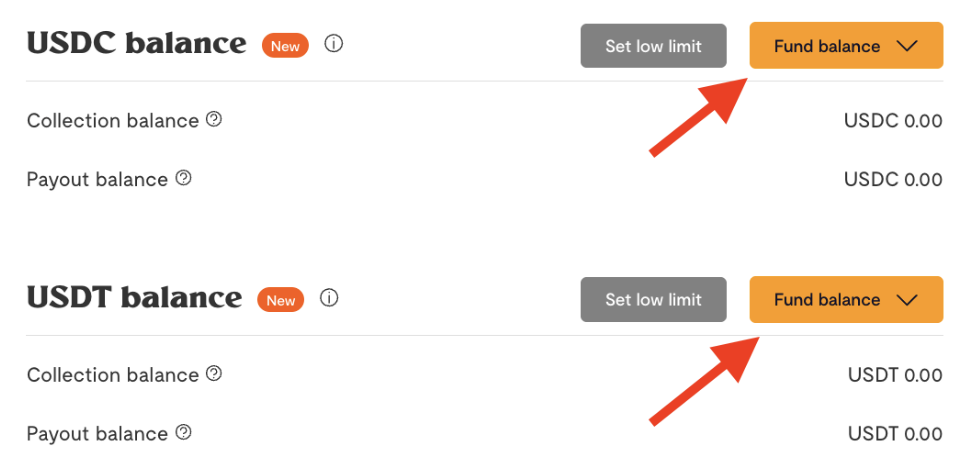
You can fund either via other currency balances or via your wallet address

Funding via Wallet Address
Click “Fund via Wallet Address”
Your wallet network and wallet address will be displayed to you. Copy your wallet address
On your external crypto wallet, click on withdraw and select a coin (RLUSD)
Select the applicable wallet network, e.g., Polygon
If you see multiple Polygon networks listed, always select Polygon POS to ensure your transaction is processed correctly.
Enter your wallet address and the amount, and confirm the transaction.
Your Flutterwave RLUSD wallet will be credited within minutes.
PS: Please ensure to double-check the coin (RLUSD, USDT or USDC), wallet network, and recipient’s wallet address before initiating your transfer. Transfers done using the wrong coin, network, or wallet address cannot be reversed.
Funding via Other Balances
Click “Fund via Other Balances”
Select a balance to fund from (NGN or USD)
Enter the amount you wish to fund
Enter your transfer PIN to authorise the transfer
How long does it take for the funds to reflect in my balance?
Your RLUSD, USDT, or USDC balances are credited within minutes. Please chat with us if you don’t receive the funds within this timeframe.
Is there a minimum funding amount?
Yes, there is a minimum funding amount of $5.
I funded my stablecoin balance, but it hasn’t reflected. What should I do?
Please share the transaction hash and a screenshot of the debit notification via chat or email.
I funded the wrong stablecoin wallet address. What should I do?
Unfortunately, wallet fundings done using the wrong coin, wallet network, or wallet address cannot be recovered.
We'd like to hear from you
Suggest the type of support articles you'd like to see
Still need help?
Get in touch if you have more questions that haven’t been answered here